Enhancing Cloud Run Security with Binary Authorization in GCP multi Project
Scenario
Distribute different roles across multiple projects with their own management or usage permissions.
The roles can be divided into 4 project roles as follows:
KMS: Store keys, usually managed by the security unitattestor: Place attestors created by KMS public key, usually managed by the security unitdeployer: Create and use attestator policy and deploy workloadattestation: Perform signing and store images
Permission Mapping Table
useris the user accountooo-sais the service account used by systems or services
| Project | Account | Permission |
|---|---|---|
| kms (CloudKMS key) | [email protected] | Cloud KMS CryptoKey Public Key Viewer |
| kms (CloudKMS key) | [email protected] | Cloud KMS CryptoKey Signer Cloud KMS CryptoKey Public Key Viewer |
| attestor (attestor) | [email protected] | Binary Authorization Attestor Image Verifier |
| attestor (attestor) | [email protected] | Binary Authorization Attestor Viewer |
| attestor (attestor) | [email protected] | Binary Authorization Attestor Viewer |
| attestor (IAM) | [email protected] | Container Analysis Notes Attacher Container Analysis Occurrences for Notes Viewer |
| attestation (Artifact) | [email protected] | Artifact Registry Reader |
Project API Mapping Table
| Project | API |
|---|---|
| kms | cloudkms.googleapis.com |
| attestor | containeranalysis.googleapis.com binaryauthorization.googleapis.com |
| attestation | containeranalysis.googleapis.com binaryauthorization.googleapis.com cloudkms.googleapis.com artifactregistry.googleapis.com |
| deployer | container.googleapis.com artifactregistry.googleapis.com binaryauthorization.googleapis.com |
Steps
Configure KMS Project
The preliminary steps are the same as setting up KMS for single-project Attestations However, the Key must provide read permission to the Attestor Project to import the public attestor, configured as follows
Key Permission Setting
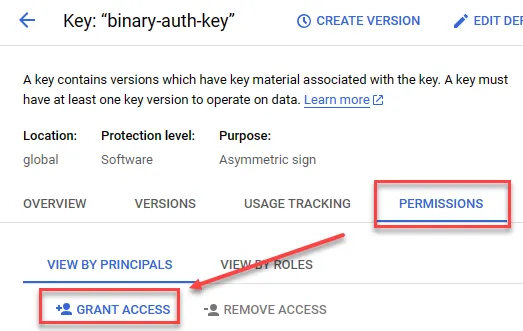
Select the previously created key in KMS, then click PERMISSIONS and GRANT ACCESS
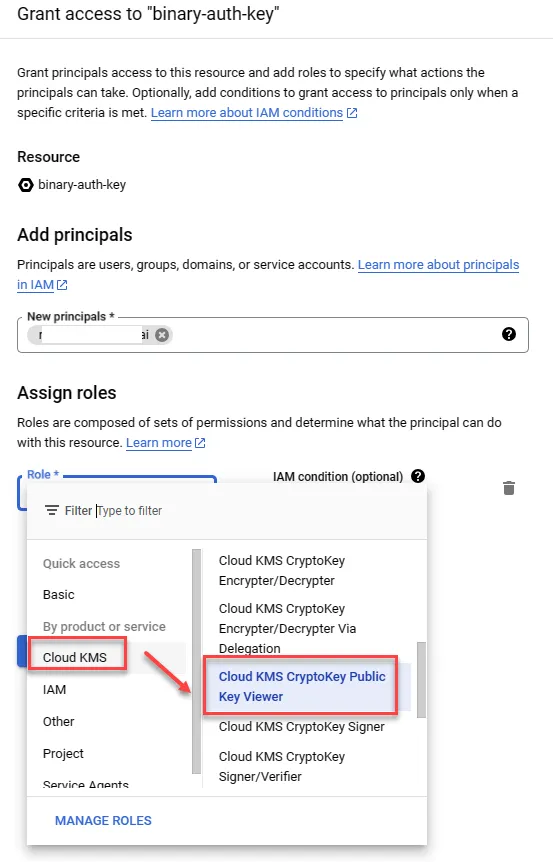
Provide Cloud KMS CryptoKey Public Key Viewer permission to the user account managing the attestor project
Configure Attestor Project
The steps are the same as setting up Attestor for a single project, just be mindful of the KMS Key permissions
Set Attestor Usage Permissions
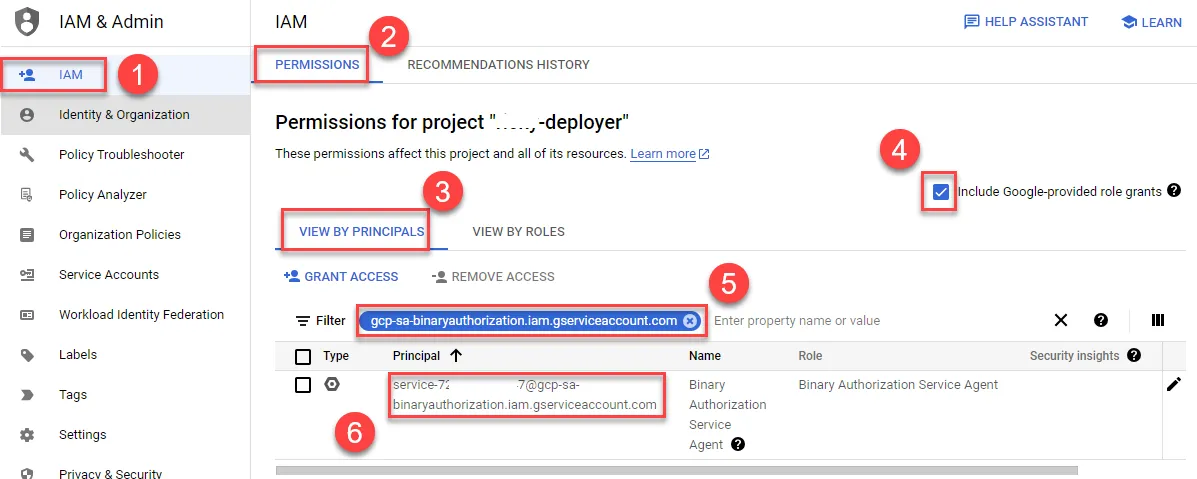
First, go to the deployer project to get the gcp-sa-binaryauthorization.iam.gserviceaccount.com information
- Enter IAM
- Click PERMISSIONS
- Check Include Google-provided role grants
- Click VIEW BY PRINCIPALS
- Enter CloudRun Service Agent to filter
- Copy this service account for use in the attestor project
Return to the attestor project to set permissions
- Open Binary Authorization
- Click ATTESTORS
- Check the previously created Attestor
- Confirm PANEL is open
- Add PRINCIPAL
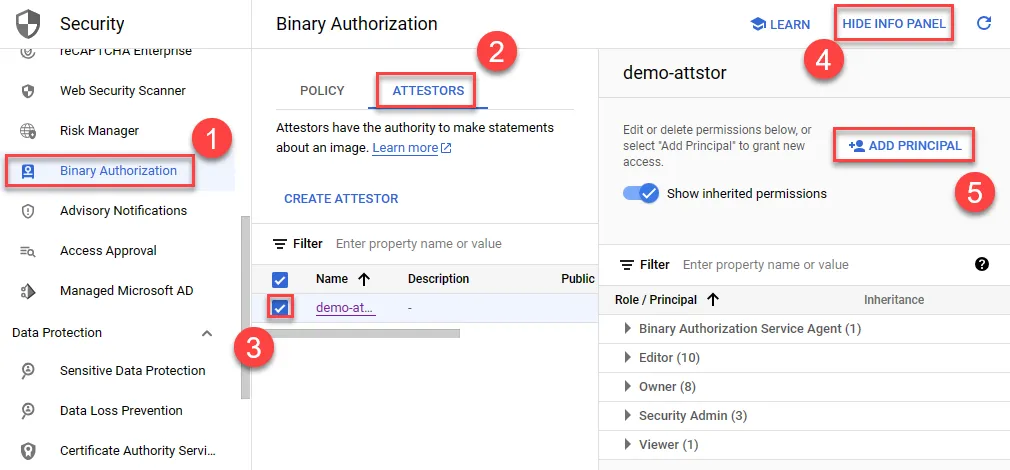
Provide the deployer binary authorization service account with Binary Authorization Attestor Image Verifier permission
- Paste the deployer binary authorization service account
- Select Binary Authorization Attestor Image Verifier permission
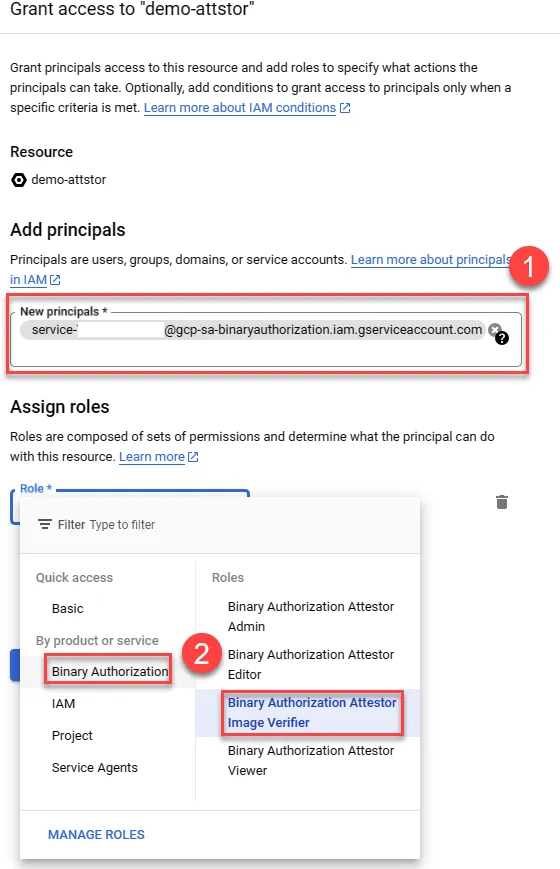
Provide the deployer project user with Binary Authorization Attestor Viewer permission to add this attestor
- Enter the deployer project user account
- Provide Binary Authorization Attestor Viewer permission
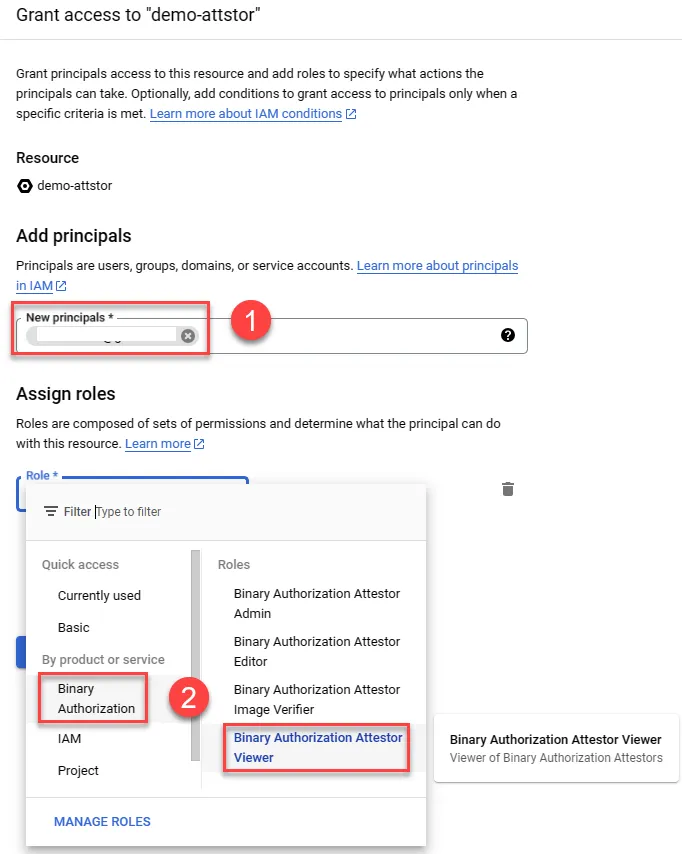
Configure Attestation Project
Enable Attestation API
You can use the following command in CloudShell to enable it, or use the previously mentioned GUI interface
1gcloud services --project=${ATTESTATION_PROJECT_ID} \2 enable containeranalysis.googleapis.com \3 binaryauthorization.googleapis.com \4 cloudkms.googleapis.com(Optional) Create Test Image
Create Artifact registry and upload nginx image
1export PROJECT_ID=${DEVSHELL_PROJECT_ID}2gcloud artifacts repositories create attestation-demo \3--repository-format=docker \4--location=asia-east15docker pull nginx6docker tag nginx:latest asia-east1-docker.pkg.dev/${PROJECT_ID}/attestation-demo/demo-nginx:latest7gcloud auth configure-docker asia-east1-docker.pkg.dev8docker push asia-east1-docker.pkg.dev/${PROJECT_ID}/attestation-demo/demo-nginx:latestAuthorize Deployer Project to Use Artifact Registry Container Image in Attestation Project
Copy the CloudRun Service Agent service account from the Deployer Project IAM
- Enter IAM
- Click PERMISSIONS
- Check Include Google-provided role grants
- Click VIEW BY PRINCIPALS
- Enter CloudRun Service Agent to filter
- Copy this service account for use in the Attestation project
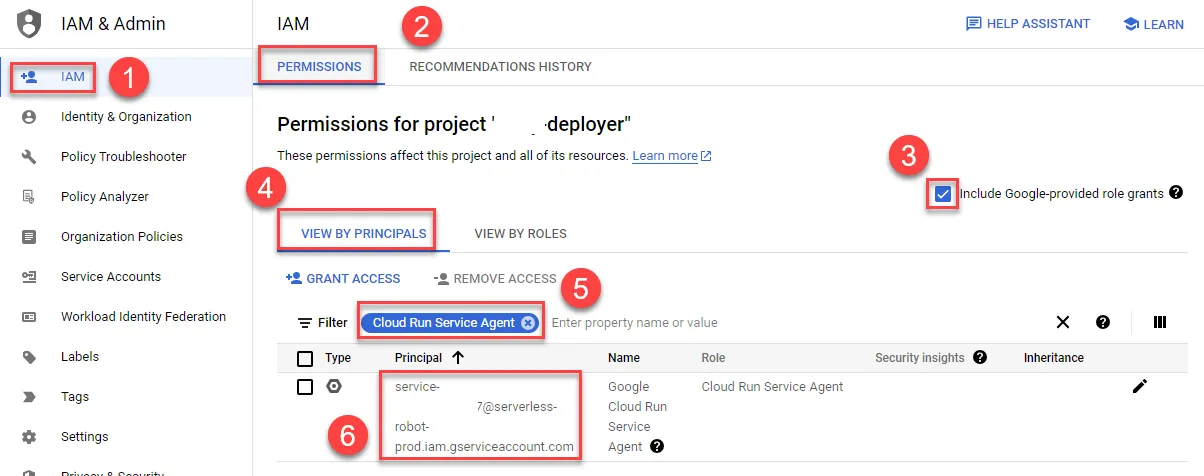
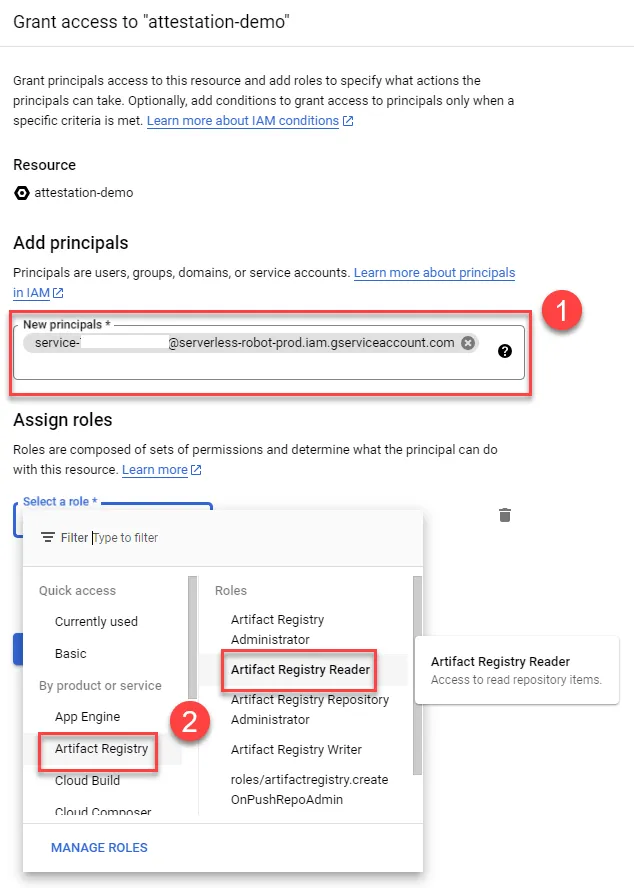
Add the CloudRun Service Agent service account from the Deployer Project to the Artifact Registry in the attestation project and provide Artifact Registry Reader permission
- Select Repositories
- Check the repo
- Display panel
- Add permission
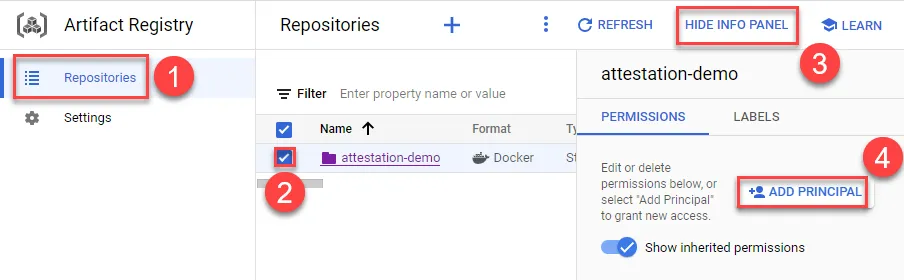
Add the CloudRun Service Agent service account and provide Artifact Registry Reader permission
Configure Deployer Project
Policy Setting
Use CloudShell to enable the API with the following command, or use the previously mentioned UI to enable the API
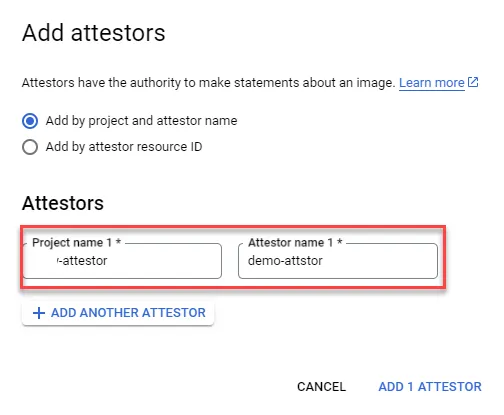
1gcloud --project=${DEPLOYER_PROJECT_ID} \2 services enable\3 container.googleapis.com\4 artifactregistry.googleapis.com\5 binaryauthorization.googleapis.comOnly the project needs to select attestor, the rest is the same as setting up Binary Authorization for single-project Attestations
Policy Testing
Since no attestation has been performed on any image yet, deploying any CloudRun will result in a warning. You can refer to enabling Binary Authorization on a new CloudRun service for testing
Perform Attestation
Permission settings
- Set the following permissions for the attestation project user account in the attestor project
- Specify that the attestor has Binary Authorization Attestor Viewer
- Add the following permissions to IAM
- Container Analysis Notes Attacher
- Container Analysis Occurrences for Notes Viewer
- Add the following permissions to the Cloud KMS key in the kms project for the attestation project user account
- Cloud KMS CryptoKey Signer
- Cloud KMS CryptoKey Public Key Viewer
After configuration is complete, you can refer to using Attestations for a single Project to use Attestation, and perform operations in the attestation project
Troubleshooting
Insufficient Attestor Permission
1ERROR: (gcloud.beta.container.binauthz.attestations.sign-and-create) PERMISSION_DENIED: permission binaryauthorization.attestors.get denied on resource projects/ATTESTOR_PROJECT_ID/attestors/demo-attstorSolution
Confirm that the attestation project user account has the Binary Authorization Attestor Viewer permission set for the specified attestor in the attestor project
Insufficient Cloud KMS Key Permission
1ERROR: (gcloud.beta.container.binauthz.attestations.sign-and-create) PERMISSION_DENIED: Permission 'cloudkms.cryptoKeyVersions.viewPublicKey' denied on resource 'projects/KMS_PROJECT_ID/locations/global/keyRings/image-keys/cryptoKeys/binary-auth-key/cryptoKeyVersions/1' (or it may not exist).Solution
Confirm that the Cloud KMS key in the kms project has added the attestation project user account permission and granted the following permissions
- Cloud KMS CryptoKey Signer
- Cloud KMS CryptoKey Public Key Viewer
Insufficient Container Analysis Notes Permission
1ERROR: (gcloud.beta.container.binauthz.attestations.sign-and-create) User [user@ooo.com] does not have permission to access projects instance [ricky-attestations] (or it may not exist): permission "containeranalysis.notes.attachOccurrence" denied for project "ATTESTOR_PROJECT_ID", entity ID "demo-attstor-note"Solution
Confirm that the attestation project user account has the following permissions added in the IAM of the attestor project
- Container Analysis Notes Attacher
- Container Analysis Occurrences for Notes Viewer
CloudRun Org Policy Setting
You can specify a particular Project / Folder / Org to forcibly enable Authorization Policies in CloudRun
Enable
This example uses a folder to enable, and all projects under that folder will enable Authorization Policies
1gcloud resource-manager org-policies allow run.allowedBinaryAuthorizationPolicies default --folder=xxxxxxxxxxxxxExpected result
1constraint: constraints/run.allowedBinaryAuthorizationPolicies2etag: CM_3iKYGEOiJjTM=3listPolicy:4 allowedValues:5 - default6updateTime: '2023-07-27T09:41:35.107169Z'Confirm
List folder status
1gcloud resource-manager org-policies allow run.allowedBinaryAuthorizationPolicies default --folder=xxxxxxxxxxxxxExpected result
1constraint: constraints/run.allowedBinaryAuthorizationPolicies2etag: CM_3iKYGEOiJjTM=3listPolicy:4 allowedValues:5 - default6updateTime: '2023-07-27T09:41:35.107169Z'Delete
Delete rule
1gcloud resource-manager org-policies describe run.allowedBinaryAuthorizationPolicies --folder=xxxxxxxxxxxxxExpected result
1constraint: constraints/run.allowedBinaryAuthorizationPolicies2etag: BwVUSr8Q7Ng=