Enable GCP Claude to be used on the Next Chat platform
While GCP has a more complete UI chatbot limited to its own Gemini series, it only supports API calls for other third-party LLM models.
To improve the Claude experience, it’s necessary to integrate a third-party Web UI for LLMs to enhance convenience. In this case, we choose Next Chat as an example, which can also be self-hosted in your own environment.
Scenario
- Use Vertex AI Claude API on GCP
- Deploy a js script on CloudFlare Worker to
simulatethe official Claude API - Configure Next Chat to use the
CloudFlare simulated Claude API
Process and Description
- Configure Vertex AI, enable it, and download the service account key
- Deploy the CloudFlare worker script, filling in the information from the service account created in the previous step into its environment variables
- Configure Next Chat to use the CloudFlare worker link
- Configure VSCode Continue extension to use the CloudFlare worker link
Execution Steps
Configure Vertex AI and enable service account key
Enable API and create service account key
1# Set variables2PROJECT_ID="YOUR_PROJECT_ID"3SERVICE_ACCOUNT_NAME="vertex-ai-user-sa"4SERVICE_ACCOUNT_DISPLAY_NAME="Vertex AI User Service Account"5KEY_FILE="vertex-ai-user-key.json"6
7gcloud services enable aiplatform.googleapis.com8
9# Create the service account10gcloud iam service-accounts create $SERVICE_ACCOUNT_NAME \11    --display-name="$SERVICE_ACCOUNT_DISPLAY_NAME" \12    --project=$PROJECT_ID13
14# Get the full service account email15SERVICE_ACCOUNT_EMAIL=$(gcloud iam service-accounts list \16    --filter="displayName:$SERVICE_ACCOUNT_DISPLAY_NAME" \17    --format='value(email)' \18    --project=$PROJECT_ID)19
20# Grant Vertex AI User role to the service account21gcloud projects add-iam-policy-binding $PROJECT_ID \22    --member="serviceAccount:$SERVICE_ACCOUNT_EMAIL" \23    --role="roles/aiplatform.user"24
25# Create and download a JSON key for the service account26gcloud iam service-accounts keys create $KEY_FILE \27    --iam-account=$SERVICE_ACCOUNT_EMAIL \28    --project=$PROJECT_ID29
30cat $KEY_FILE
Deploy CloudFlare worker script
Use the vertexai-cf-workers js script to deploy to CloudFlare Worker
Add worker
Log in to your CloudFlare account and create a worker
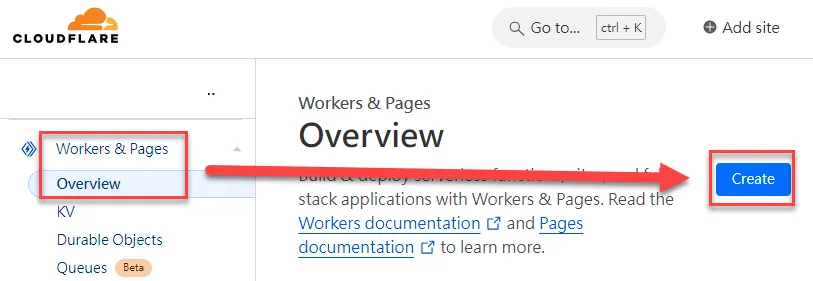
Click to create a worker
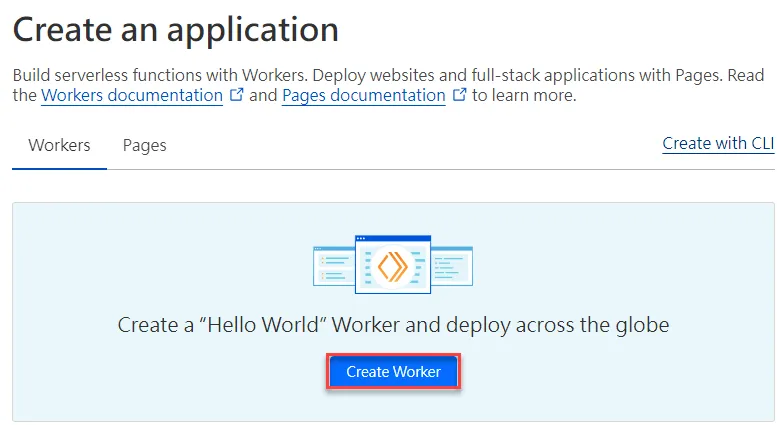
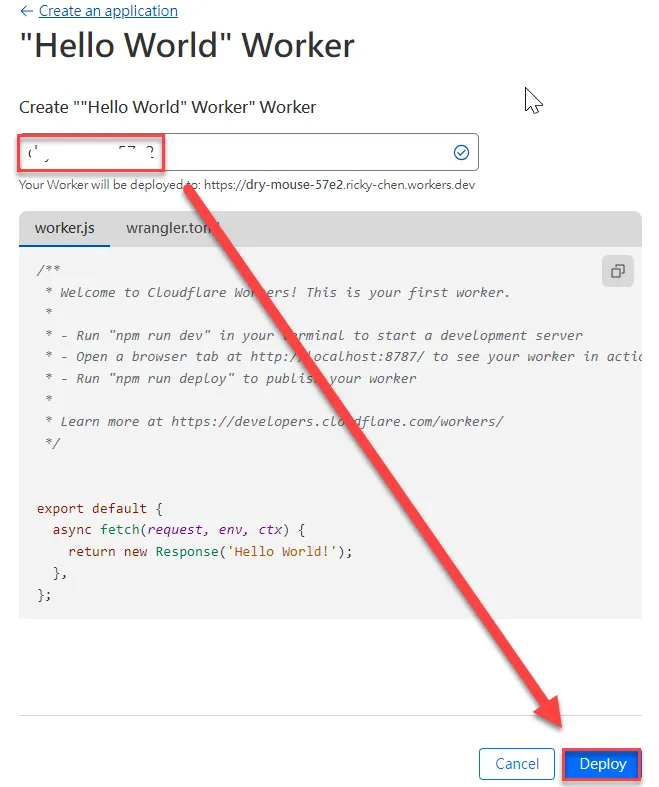
Add a worker name and deploy
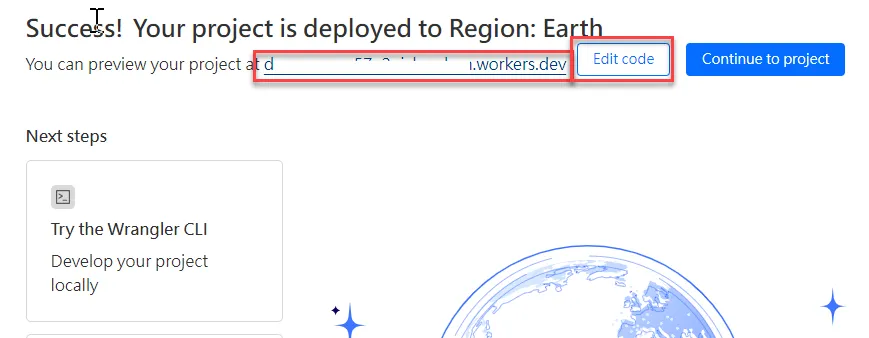
Deploy and Edit
You can click the link after deployment to check, and then click Edit Code when confirmed
Paste the worker.js code into the left code editing area and deploy
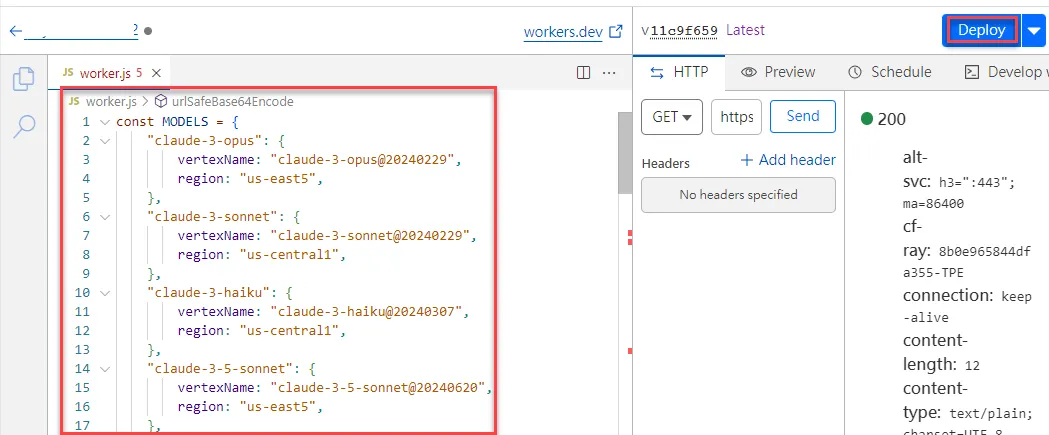
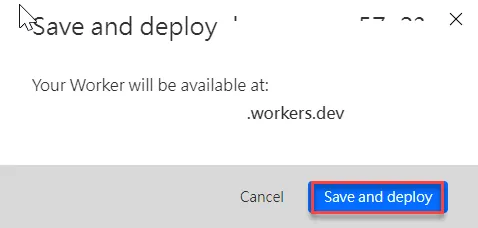
Click Save and Deploy
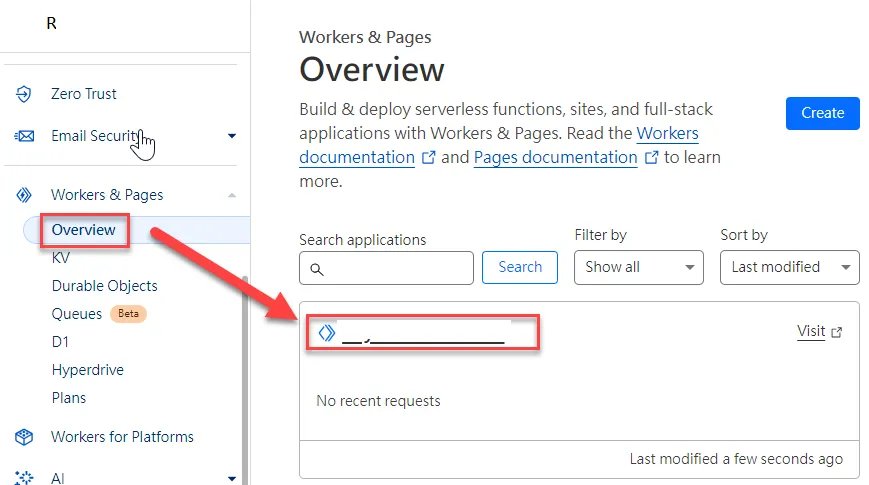
Configure Environment Variables
Click to enter the worker you just deployed
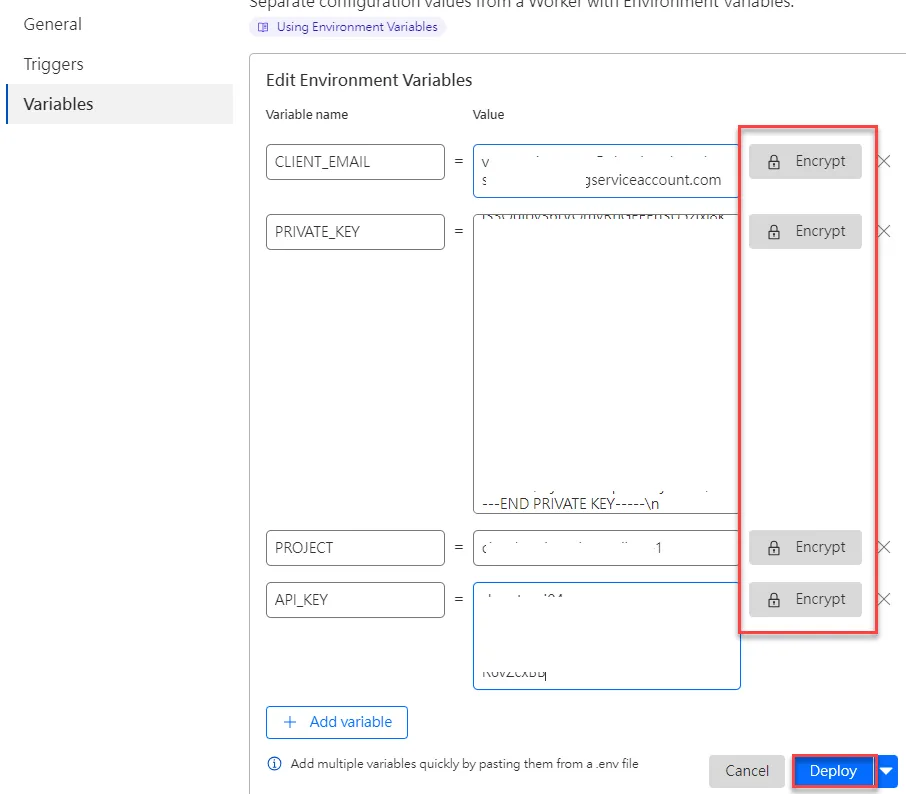
Click to add environment variables
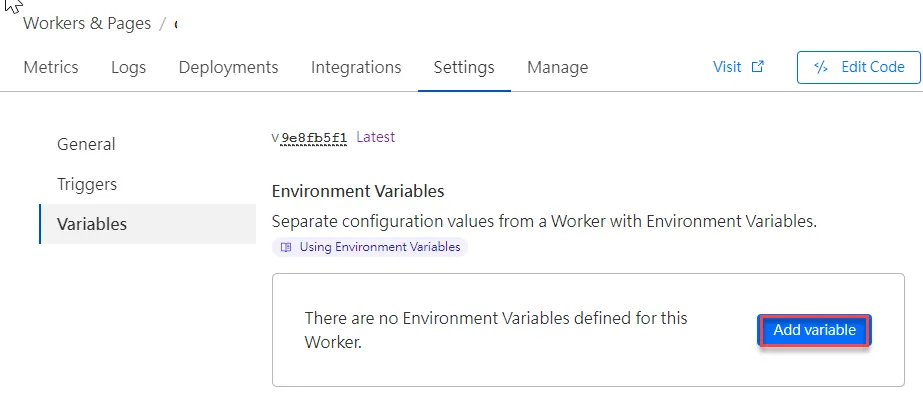
The environment variables are mainly related information from the GCP service account. You can also click to encrypt if needed
API_KEY: Customize an API key for callsCLIENT_EMAIL: Email from the GCP service accountPRIVATE_KEY: Private key from the GCP service accountPROJECT: Project ID in GCP After setting, click Deploy
Configure Next Chat
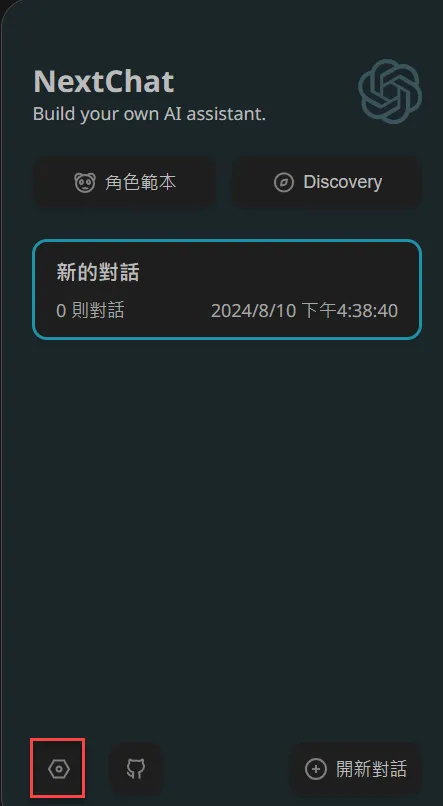
Click here to enter the Next Chat interface, then click Settings
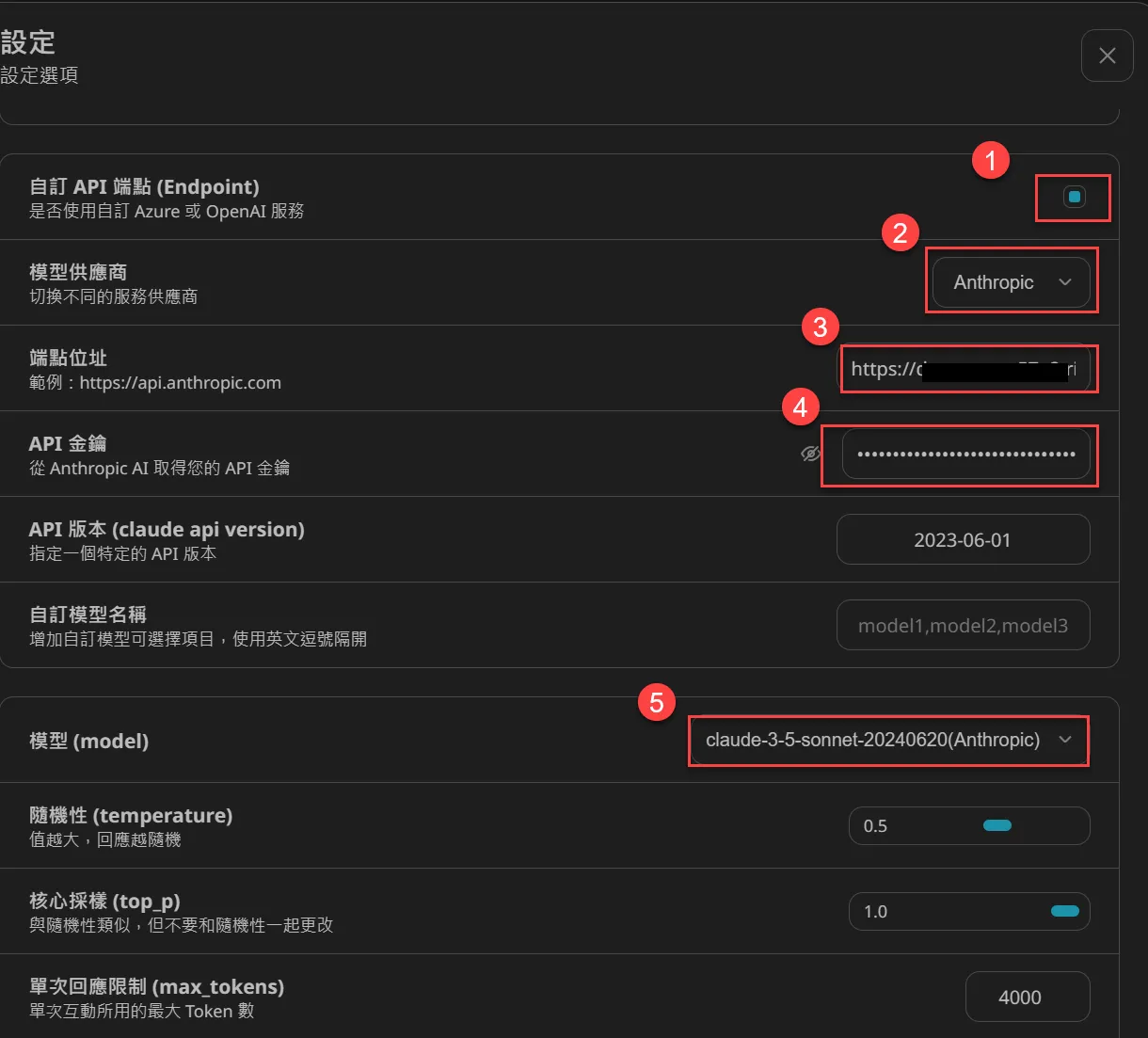
- Enable custom API Endpoint
- Choose Anthropic model provider
- Enter the CloudFlare worker URL
- Enter the API_KEY created earlier
- Select claude-3.5-sonnet-20240620(Anthropic) Finally, press the “X” in the upper right corner to close
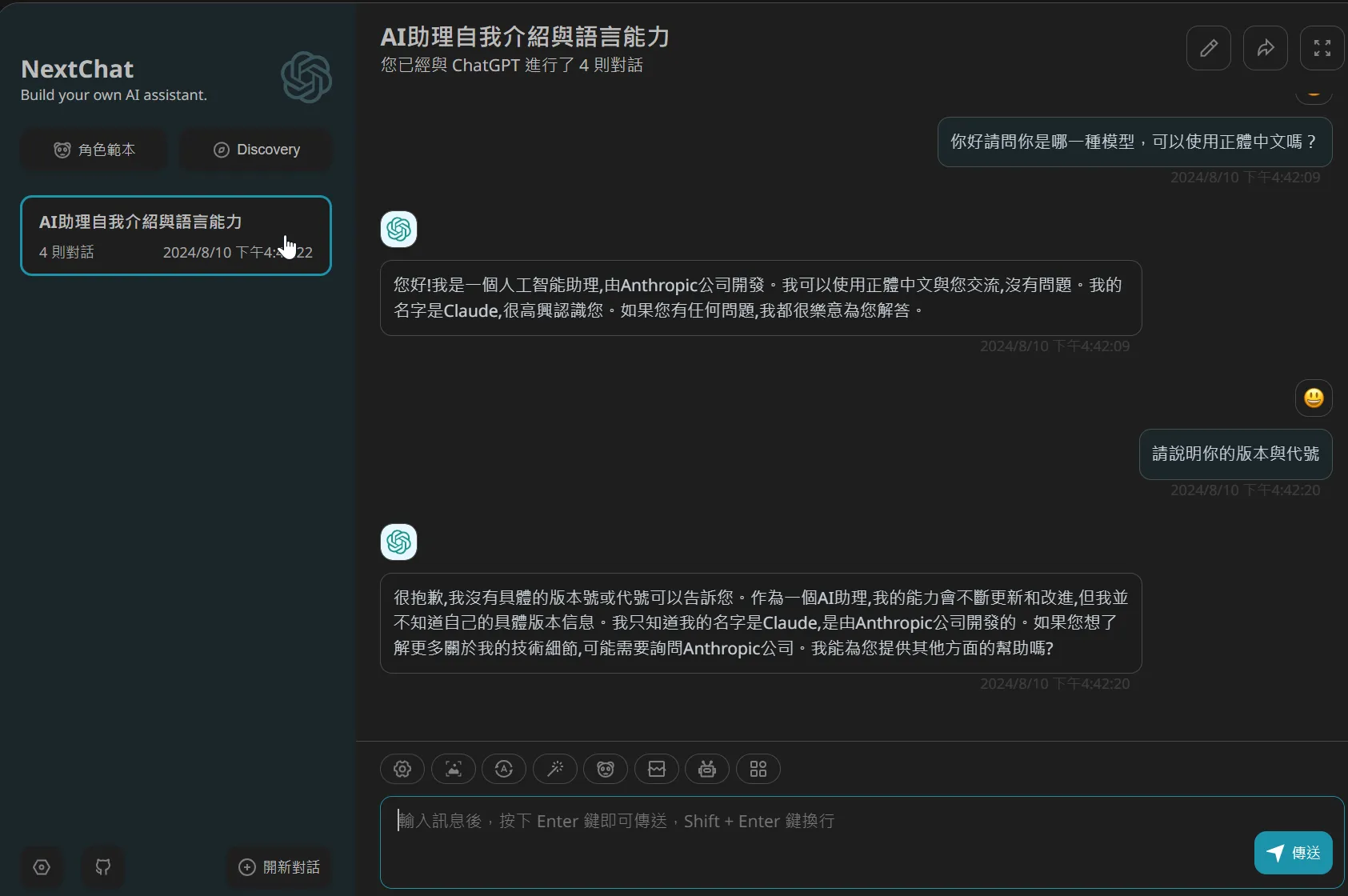
Then proceed with testing
Configure VSCode Continue extension
Install Continue extension and configure the config.json models setting as below to use.
1 "models": [2 {3 "model": "claude-3-5-sonnet-20240620",4 "contextLength": 200000,5 "title": "Claude 3 Sonnet",6 "apiKey": "YOUR_API_KEY",7 "apiBase": "https://YOUR_CLOUDFLARE_WORKER_URL/v1/",8 "provider": "anthropic"9 }10 ],References
worker.js Code
Source: vertexai-cf-workers js script
257 collapsed lines
1const MODELS = {2 "claude-3-opus": {3 vertexName: "claude-3-opus@20240229",4 region: "us-east5",5 },6 "claude-3-sonnet": {7 vertexName: "claude-3-sonnet@20240229",8 region: "us-central1",9 },10 "claude-3-haiku": {11 vertexName: "claude-3-haiku@20240307",12 region: "us-central1",13 },14 "claude-3-5-sonnet": {15 vertexName: "claude-3-5-sonnet@20240620",16 region: "us-east5",17 },18 "claude-3-opus-20240229": {19 vertexName: "claude-3-opus@20240229",20 region: "us-east5",21 },22 "claude-3-sonnet-20240229": {23 vertexName: "claude-3-sonnet@20240229",24 region: "us-central1",25 },26 "claude-3-haiku-20240307": {27 vertexName: "claude-3-haiku@20240307",28 region: "us-central1",29 },30 "claude-3-5-sonnet-20240620": {31 vertexName: "claude-3-5-sonnet@20240620",32 region: "us-east5",33 },34};35
36addEventListener("fetch", (event) => {37 event.respondWith(handleRequest(event.request));38});39
40async function handleRequest(request) {41 let headers = new Headers({42 "Access-Control-Allow-Origin": "*",43 "Access-Control-Allow-Headers": "*",44 "Access-Control-Allow-Methods": "GET, POST, OPTIONS",45 });46 if (request.method === "OPTIONS") {47 return new Response(null, { headers });48 } else if (request.method === "GET") {49 return createErrorResponse(405, "invalid_request_error", "GET method is not allowed");50 }51
52 const apiKey = request.headers.get("x-api-key");53 if (!API_KEY || API_KEY !== apiKey) {54 return createErrorResponse(401, "authentication_error", "invalid x-api-key");55 }56
57 const signedJWT = await createSignedJWT(CLIENT_EMAIL, PRIVATE_KEY)58 const [token, err] = await exchangeJwtForAccessToken(signedJWT)59 if (token === null) {60 console.log(`Invalid jwt token: ${err}`)61 return createErrorResponse(500, "api_error", "invalid authentication credentials");62 }63
64 try {65 const url = new URL(request.url);66 const normalizedPathname = url.pathname.replace(/^(\/)+/, '/');67 switch(normalizedPathname) {68 case "/v1/v1/messages":69 case "/v1/messages":70 case "/messages":71 return handleMessagesEndpoint(request, token);72 default:73 return createErrorResponse(404, "not_found_error", "Not Found");74 }75 } catch (error) {76 console.error(error);77 return createErrorResponse(500, "api_error", "An unexpected error occurred");78 }79}80
81async function handleMessagesEndpoint(request, api_token) {82 const anthropicVersion = request.headers.get('anthropic-version');83 if (anthropicVersion && anthropicVersion !== '2023-06-01') {84 return createErrorResponse(400, "invalid_request_error", "API version not supported");85 }86
87 let payload;88 try {89 payload = await request.json();90 } catch (err) {91 return createErrorResponse(400, "invalid_request_error", "The request body is not valid JSON.");92 }93
94 payload.anthropic_version = "vertex-2023-10-16";95
96 if (!payload.model) {97 return createErrorResponse(400, "invalid_request_error", "Missing model in the request payload.");98 } else if (!MODELS[payload.model]) {99 return createErrorResponse(400, "invalid_request_error", `Model \`${payload.model}\` not found.`);100 }101
102 const stream = payload.stream || false;103 const model = MODELS[payload.model];104 const url = `https://${model.region}-aiplatform.googleapis.com/v1/projects/${PROJECT}/locations/${model.region}/publishers/anthropic/models/${model.vertexName}:streamRawPredict`;105 delete payload.model;106
107 let response, contentType108 try {109 response = await fetch(url, {110 method: 'POST',111 headers: {112 'Content-Type': 'application/json',113 'Authorization': `Bearer ${api_token}`114 },115 body: JSON.stringify(payload)116 });117 contentType = response.headers.get("Content-Type") || "application/json";118 } catch (error) {119 return createErrorResponse(500, "api_error", "Server Error");120 }121
122 if (stream && contentType.startsWith('text/event-stream')) {123 if (!(response.body instanceof ReadableStream)) {124 return createErrorResponse(500, "api_error", "Server Error");125 }126
127 const encoder = new TextEncoder();128 const decoder = new TextDecoder("utf-8");129 let buffer = '';130 let { readable, writable } = new TransformStream({131 transform(chunk, controller) {132 let decoded = decoder.decode(chunk, { stream: true });133 buffer += decoded134 let eventList = buffer.split(/\r\n\r\n|\r\r|\n\n/g);135 if (eventList.length === 0) return;136 buffer = eventList.pop();137
138 for (let event of eventList) {139 controller.enqueue(encoder.encode(`${event}\n\n`));140 }141 },142 });143 response.body.pipeTo(writable);144 return new Response(readable, {145 status: response.status,146 headers: {147 "Content-Type": response.headers.get("Content-Type") || "text/event-stream",148 "Access-Control-Allow-Origin": "*",149 },150 });151 } else {152 try {153 let data = await response.text();154 return new Response(data, {155 status: response.status,156 headers: {157 "Content-Type": contentType,158 "Access-Control-Allow-Origin": "*",159 },160 });161 } catch (error) {162 return createErrorResponse(500, "api_error", "Server Error");163 }164 }165}166
167function createErrorResponse(status, errorType, message) {168 const errorObject = { type: "error", error: { type: errorType, message: message } };169 return new Response(JSON.stringify(errorObject), {170 status: status,171 headers: {172 "Content-Type": "application/json",173 "Access-Control-Allow-Origin": "*",174 },175 });176}177
178async function createSignedJWT(email, pkey) {179 pkey = pkey.replace(/-----BEGIN PRIVATE KEY-----|-----END PRIVATE KEY-----|\r|\n|\\n/g, "");180 let cryptoKey = await crypto.subtle.importKey(181 "pkcs8",182 str2ab(atob(pkey)),183 {184 name: "RSASSA-PKCS1-v1_5",185 hash: { name: "SHA-256" },186 },187 false,188 ["sign"]189 );190
191 const authUrl = "https://www.googleapis.com/oauth2/v4/token";192 const issued = Math.floor(Date.now() / 1000);193 const expires = issued + 600;194
195 const header = {196 alg: "RS256",197 typ: "JWT",198 };199
200 const payload = {201 iss: email,202 aud: authUrl,203 iat: issued,204 exp: expires,205 scope: "https://www.googleapis.com/auth/cloud-platform",206 };207
208 const encodedHeader = urlSafeBase64Encode(JSON.stringify(header));209 const encodedPayload = urlSafeBase64Encode(JSON.stringify(payload));210
211 const unsignedToken = `${encodedHeader}.${encodedPayload}`;212
213 const signature = await crypto.subtle.sign(214 "RSASSA-PKCS1-v1_5",215 cryptoKey,216 str2ab(unsignedToken)217 );218
219 const encodedSignature = urlSafeBase64Encode(signature);220 return `${unsignedToken}.${encodedSignature}`;221}222
223async function exchangeJwtForAccessToken(signed_jwt) {224 const auth_url = "https://www.googleapis.com/oauth2/v4/token";225 const params = {226 grant_type: "urn:ietf:params:oauth:grant-type:jwt-bearer",227 assertion: signed_jwt,228 };229
230 const r = await fetch(auth_url, {231 method: "POST",232 headers: { "Content-Type": "application/x-www-form-urlencoded" },233 body: Object.entries(params)234 .map(([k, v]) => k + "=" + v)235 .join("&"),236 }).then((res) => res.json());237
238 if (r.access_token) {239 return [r.access_token, ""];240 }241
242 return [null, JSON.stringify(r)];243}244
245function str2ab(str) {246 const buffer = new ArrayBuffer(str.length);247 let bufferView = new Uint8Array(buffer);248 for (let i = 0; i < str.length; i++) {249 bufferView[i] = str.charCodeAt(i);250 }251 return buffer;252}253
254function urlSafeBase64Encode(data) {255 let base64 = typeof data === "string" ? btoa(encodeURIComponent(data).replace(/%([0-9A-F]{2})/g, (match, p1) => String.fromCharCode(parseInt("0x" + p1)))) : btoa(String.fromCharCode(...new Uint8Array(data)));256 return base64.replace(/\+/g, "-").replace(/\//g, "_").replace(/=+$/, "");257}